<?xml version="1.0" encoding="utf-8"?>
<feed xmlns="http://www.w3.org/2005/Atom">
  <title>Jan&#39;s Blog</title>
  
  
  <link href="https://blog.citlali.moe/atom.xml" rel="self"/>
  
  <link href="https://blog.citlali.moe/"/>
  <updated>2025-04-04T12:25:01.286Z</updated>
  <id>https://blog.citlali.moe/</id>
  
  <author>
    <name>Jan White</name>
    
  </author>
  
  <generator uri="https://hexo.io/">Hexo</generator>
  
  <entry>
    <title>深入双绞线以太网</title>
    <link href="https://blog.citlali.moe/2025/04/04/ethernet-over-twisted-pair/"/>
    <id>https://blog.citlali.moe/2025/04/04/ethernet-over-twisted-pair/</id>
    <published>2025-04-04T04:23:32.000Z</published>
    <updated>2025-04-04T12:25:01.286Z</updated>
    
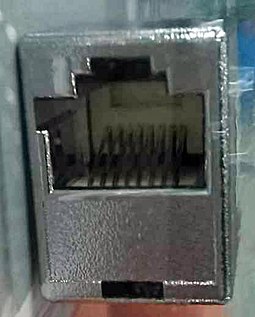
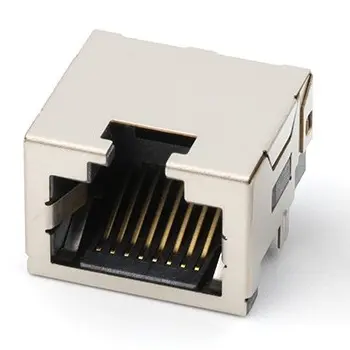
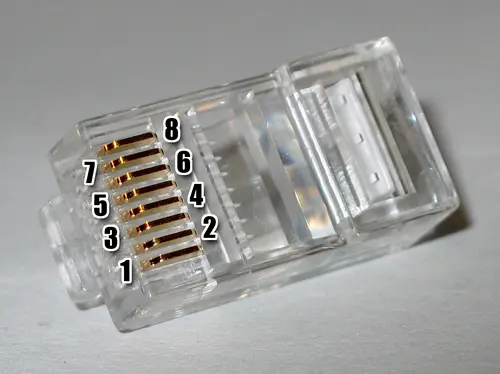
    <content type="html"><![CDATA[<h1 id="双绞线以太网"><a href="#双绞线以太网" class="headerlink" title="双绞线以太网"></a>双绞线以太网</h1><h2 id="1-前言"><a href="#1-前言" class="headerlink" title="1. 前言"></a>1. 前言</h2><p>当我刚开始接触计算机网络的时候，联网对我来说来只是一个非常简单的概念 - 只需要将网线的两端，分别连接计算机和路由器的网口，即可访问互联网时间。在那之后，当我开始更加深入学习计算机网络的时候，我开始了解到过往我们称之为网线的东西，实际上是双绞线，并有不同规格来支撑不同的宽带；而网口，我们则称之为 RJ45 接口，同时也定义了针脚及线序。当然，在初学时，我们可能更加关注其传输的电平信号，以及相应的数据帧，即以太网帧。<br>说到这里，我相信我们大概对“以太网”有一定的了解了，很显然它也是一个协议栈，定义了包含从接口，到线缆规格，再到电平信号以及如何将其解析为数据帧的方方面面。在这里，我们将更深入的去了解前二者中的一部分，即 RJ45 接口和双绞线。</p><h2 id="2-RJ45"><a href="#2-RJ45" class="headerlink" title="2. RJ45"></a>2. RJ45</h2><p>RJ45，全称为标准插座接口（Registered Jack）第 45 号标准。其定义了线缆中导线的个数以及线序，并规定使用 8P8C 的物理接口。但与你想象中的网口不同的是，RJ45 接口实际上是为了连接电话网络而开发的。它与当今常见的网口不同，真正的 RJ45 或者说 RJ45S 接口，实际上带有键控，与当今的网口不兼容。<br><img src="/./img/RJ45S_female_connector.jpg?200x" alt="RJ45S - 带键控的 8P8C 接口，一侧带有一个额外的凸耳，可防止其与常规（非键控）8P 配接插孔。" title="RJ45S - 带键控的 8P8C 接口"><br>现在我们常见的网口，实际上是指非键控的 8P8C 接口，其中 8P8C 表示它有 8 个卡口位（Position）和 8 个触点（Contacts）。<br><img src="/./img/8P8C-female-SMT.webp?200x" alt="非键控的 8P8C 母插孔" title="非键控的 8P8C 母插孔"><br><img src="/./img/RJ45plug-8p8c.webp?200x" alt="非键控的 8P8C 公插头" title="非键控的 8P8C 公插头">  </p><h2 id="3-双绞线"><a href="#3-双绞线" class="headerlink" title="3. 双绞线"></a>3. 双绞线</h2><h2 id="4-802-3"><a href="#4-802-3" class="headerlink" title="4. 802.3"></a>4. 802.3</h2><h2 id="5-数字信号"><a href="#5-数字信号" class="headerlink" title="5. 数字信号"></a>5. 数字信号</h2><h2 id="6"><a href="#6" class="headerlink" title="6."></a>6.</h2>]]></content>


    <summary type="html">&lt;h1 id=&quot;双绞线以太网&quot;&gt;&lt;a href=&quot;#双绞线以太网&quot; class=&quot;headerlink&quot; title=&quot;双绞线以太网&quot;&gt;&lt;/a&gt;双绞线以太网&lt;/h1&gt;&lt;h2 id=&quot;1-前言&quot;&gt;&lt;a href=&quot;#1-前言&quot; class=&quot;headerlink&quot; title=&quot;1</summary>


  </entry>
  
  <entry>
    <title>Hello World</title>
    <link href="https://blog.citlali.moe/2025/03/24/hello-world/"/>
    <id>https://blog.citlali.moe/2025/03/24/hello-world/</id>
    <published>2025-03-24T13:42:44.415Z</published>
    <updated>2025-03-24T13:42:44.415Z</updated>
    
    <content type="html"><![CDATA[<p>Welcome to <a href="https://hexo.io/">Hexo</a>! This is your very first post. Check <a href="https://hexo.io/docs/">documentation</a> for more info. If you get any problems when using Hexo, you can find the answer in <a href="https://hexo.io/docs/troubleshooting.html">troubleshooting</a> or you can ask me on <a href="https://github.com/hexojs/hexo/issues">GitHub</a>.</p><h2 id="Qucik-Test"><a href="#Qucik-Test" class="headerlink" title="Qucik Test"></a>Qucik Test</h2><p>Just type something here to test.</p><h2 id="Quick-Start"><a href="#Quick-Start" class="headerlink" title="Quick Start"></a>Quick Start</h2><h3 id="Create-a-new-post"><a href="#Create-a-new-post" class="headerlink" title="Create a new post"></a>Create a new post</h3><figure class="highlight bash"><table><tr><td class="gutter"><pre><span class="line">1</span><br></pre></td><td class="code"><pre><code class="hljs bash">$ hexo new <span class="hljs-string">&quot;My New Post&quot;</span><br></code></pre></td></tr></table></figure><p>More info: <a href="https://hexo.io/docs/writing.html">Writing</a></p><h3 id="Run-server"><a href="#Run-server" class="headerlink" title="Run server"></a>Run server</h3><figure class="highlight bash"><table><tr><td class="gutter"><pre><span class="line">1</span><br></pre></td><td class="code"><pre><code class="hljs bash">$ hexo server<br></code></pre></td></tr></table></figure><p>More info: <a href="https://hexo.io/docs/server.html">Server</a></p><h3 id="Generate-static-files"><a href="#Generate-static-files" class="headerlink" title="Generate static files"></a>Generate static files</h3><figure class="highlight bash"><table><tr><td class="gutter"><pre><span class="line">1</span><br></pre></td><td class="code"><pre><code class="hljs bash">$ hexo generate<br></code></pre></td></tr></table></figure><p>More info: <a href="https://hexo.io/docs/generating.html">Generating</a></p><h3 id="Deploy-to-remote-sites"><a href="#Deploy-to-remote-sites" class="headerlink" title="Deploy to remote sites"></a>Deploy to remote sites</h3><figure class="highlight bash"><table><tr><td class="gutter"><pre><span class="line">1</span><br></pre></td><td class="code"><pre><code class="hljs bash">$ hexo deploy<br></code></pre></td></tr></table></figure><p>More info: <a href="https://hexo.io/docs/one-command-deployment.html">Deployment</a></p>]]></content>


    <summary type="html">&lt;p&gt;Welcome to &lt;a href=&quot;https://hexo.io/&quot;&gt;Hexo&lt;/a&gt;! This is your very first post. Check &lt;a href=&quot;https://hexo.io/docs/&quot;&gt;documentation&lt;/a&gt; for</summary>


  </entry>
  
</feed>